Add Android System apps to the Apps Library
Any built-in app included by a device manufacturer can be turned on in an Android work profile by default, appearing the same way as other company-approved apps. We recommend checking the Google Play Store for the system app first. If the app is there, downloading through the Play Store will enable updating and/or managed configuration.
To add Android System apps to the Apps Library:
- Go to the Libraries tab.
- Click the Apps icon.
- Choose Add New > System App (Android).
- Name the app, enter the package name and specify applicable options.

NOTE: When adding a system app through KACE Cloud, you must provide the app's package name. We recommend starting on the device manufacturer’s website
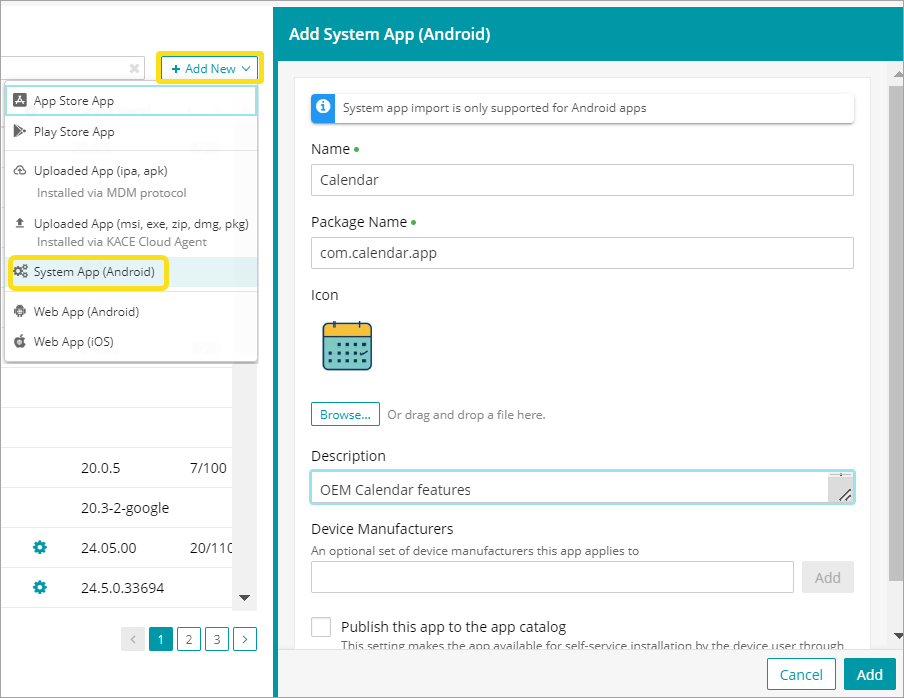
- Click Add.